


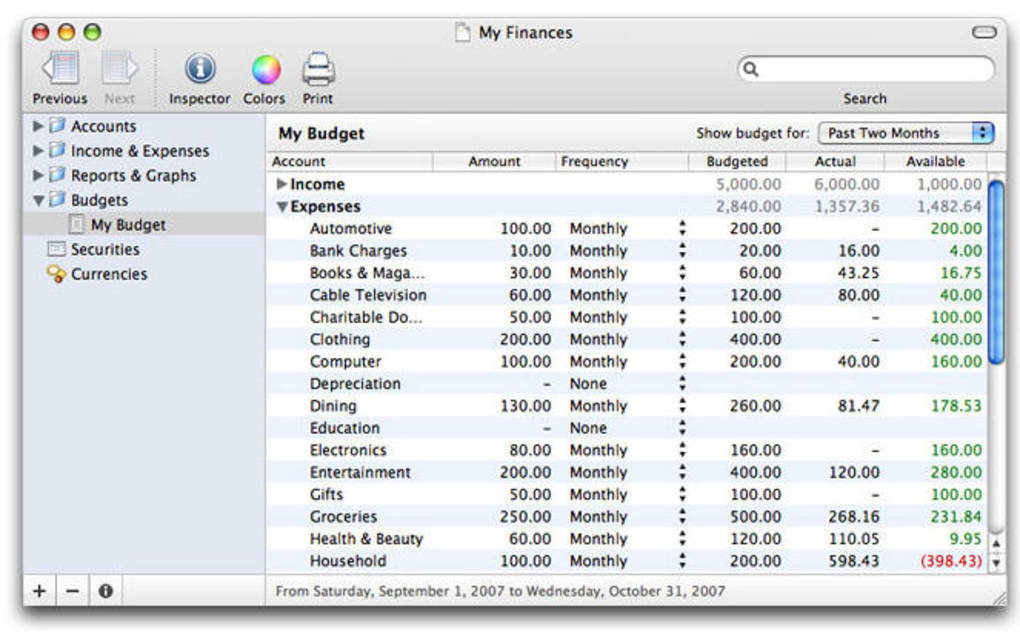

Download Liquid Ledger – Advanced Money Management for Mac
Overview
Liquid Ledger stands out as one of the most sophisticated personal finance applications available for macOS. Built around a clean, modern interface, the software lets users categorize income and expenses with precision, while supporting multiple accounts, foreign currencies, and an investment‑portfolio tracker. Whether you are a casual budget‑conscious user or a seasoned investor, Liquid Ledger offers a level of depth that rivals many desktop‑only accounting tools.
The program’s strength lies not only in its financial tracking capabilities but also in the productivity suite that accompanies it: AppleScript support, customizable keyboard shortcuts, and unlimited undo/redo functions empower you to automate repetitive tasks and stay in control of your data. Export options such as QIF, CSV, and TXT make migration to other platforms seamless, and built‑in budgeting tools let you set spending limits and instantly see whether you are staying on track. Although the graph and report library is not exhaustive, the available visualizations—cash‑flow charts, expense breakdowns, and investment performance graphs—provide clear insights for everyday decision‑making.
In short, Liquid Ledger is a secure, feature‑rich, and highly customizable solution for anyone who wants to take charge of their finances on a Mac.
Key Features
- Multi‑Account Management: Track checking, savings, credit cards, and investment accounts—all from a single dashboard.
- Foreign Currency Support: Enter and convert transactions in any currency, with live exchange‑rate updates.
- Budget Builder: Create monthly or yearly budgets, set category limits, and receive visual alerts when you approach thresholds.
- Reconciliation Engine: Match your ledger entries against bank statements to ensure accuracy.
- Check Printing: Generate and print professional‑looking checks directly from the app.
- Rich Reporting Suite: Export cash‑flow, expense‑by‑category, and portfolio performance reports in PDF or HTML.
- Data Export Options: Export transactions to QIF, CSV, or TXT for use with other accounting software.
- Automation with AppleScript: Write or download scripts to automate imports, categorization, and recurring entries.
- Custom Keyboard Shortcuts: Assign shortcuts to frequent actions like “Add Transaction” or “Run Budget Report.”
- Unlimited Undo/Redo: Experiment with changes without fear—revert any number of steps.
Each feature has been crafted with the Mac ecosystem in mind, ensuring seamless integration with macOS security protocols and system services. The application also respects user privacy: all data is stored locally unless you explicitly enable cloud backup, giving you full control over your financial information. The combination of robust accounting tools and productivity enhancements makes Liquid Ledger a true all‑in‑one solution for personal finance enthusiasts.
Installation & Compatibility
Step‑by‑Step Installation Guide
Installing Liquid Ledger is straightforward, even for users who are not technically inclined. Follow these steps for a hassle‑free setup:
- Visit the official Liquid Ledger website and click the “Download for macOS” button.
- The installer package (
.dmg) will download to yourDownloadsfolder. - Double‑click the
.dmgfile to mount the disk image. - Drag the Liquid Ledger icon into the
Applicationsfolder. - Launch the app from
Applications. macOS may prompt you to confirm that you want to open an app from an identified developer—click “Open.” - Upon first launch, you’ll be guided through a brief onboarding wizard that helps you import existing data, set your primary currency, and create your first budget.
System Requirements and Operating System Support
Liquid Ledger is optimized for macOS 11 (Big Sur) and later, including macOS Ventura and macOS Sonoma. The software requires at least 4 GB of RAM and 200 MB of free disk space for the core application, though additional space will be needed for transaction history and exported reports. The application runs natively on Apple Silicon (M1, M2) and Intel‑based Macs, taking advantage of the latest macOS performance enhancements.
While the primary focus is on the Mac platform, Liquid Ledger also offers a lightweight web‑based companion that allows you to view reports on iOS and iPadOS devices. However, full editing capabilities remain exclusive to the macOS desktop client. Regular updates are delivered through the built‑in updater, ensuring that you receive security patches, new features, and compatibility tweaks without manual intervention.
Pros & Cons
What Users Love About Liquid Ledger
- Deep multi‑account and multi‑currency support makes it ideal for global users.
- Powerful budgeting tools with real‑time visual alerts keep spending in check.
- AppleScript integration allows advanced automation tailored to personal workflows.
- Unlimited undo/redo provides a safety net for experimental budgeting.
- Export flexibility (QIF, CSV, TXT) simplifies migration to other finance platforms.
Areas for Improvement
- The graph library, while functional, could benefit from more customizable chart types.
- No native Windows or Android version; macOS‑only focus limits cross‑platform adoption.
- Initial learning curve can be steep for users unfamiliar with desktop accounting software.
- Pricing is a one‑time purchase; some competitors offer subscription models with cloud sync.
- Mobile companion app provides only read‑only access, lacking full editing capabilities.
Frequently Asked Questions
Is Liquid Ledger a free application?
No, Liquid Ledger is a premium product. It is sold as a one‑time purchase for $39.99, which includes all future updates for the current major version.
Can I import data from other finance apps?
Yes. Liquid Ledger supports import of QIF, CSV, and TXT files, making it easy to bring in transaction histories from Quicken, Moneydance, or other CSV‑based tools.
Does Liquid Ledger sync with online banking?
Direct bank syncing is not built‑in. Users can manually download bank statements (CSV or QIF) and import them, or use third‑party scripts to automate the download‑and‑import process.
Is my financial data stored securely?
All data is stored locally on your Mac and encrypted with macOS FileVault when enabled. The app does not transmit any personal financial information unless you explicitly export or back up data to a cloud service.
Can I customize keyboard shortcuts?
Absolutely. Liquid Ledger includes a preferences pane where you can assign or reassign shortcuts for common actions such as “New Transaction,” “Run Budget Report,” and “Export CSV.”
Conclusion & Call to Action
Liquid Ledger delivers a compelling blend of powerful accounting features and Mac‑centric productivity tools. Its ability to handle multiple currencies, detailed budgeting, and extensive export options makes it a top choice for anyone who demands precision in personal finance management. While the lack of a native Windows version and a limited mobile editing experience may deter some, the depth of automation via AppleScript and the peace of mind offered by local encryption offset these drawbacks for the majority of macOS users. If you are ready to replace spreadsheets, basic expense trackers, or fragmented budgeting apps with a single, secure, and highly customizable solution, Liquid Ledger is worth the investment.
$39.99 – Download Liquid Ledger now and start taking control of your money with a tool built specifically for the Mac ecosystem.







